
In today’s digital age, students and parents no longer need to wait for physical result slips to know academic outcomes. Knowing how to check student results online easily has become essential, especially during WAEC, NECO, and other Nigerian examinations.

Accessing results online saves time, reduces stress, and ensures accuracy. Schools that provide a reliable system for online result checking help students and parents stay informed instantly, eliminating confusion and delays.
However, not all schools have efficient processes in place, and students often struggle to navigate result portals or verify information. This makes having a centralized and easy-to-use system crucial for smooth result access.
In this article, we’ll show step-by-step methods for checking student results online in Nigeria and highlight how schools can implement solutions to make the process easier, faster, and more reliable.
When we get to the ExcelMind section, we’ll demonstrate how school owners can leverage ExcelMind’s features to provide secure, accessible, and organized online result access for their students.
Read Also: WAEC 2026 Rules: 9 Costly Mistakes Schools Must Avoid
Step-by-Step: How to Check Student Results Online Easily for External Exams
Accessing external exam results (like WAEC, NECO, and JAMB) is the first step for students and parents to monitor academic performance. Here’s a detailed, step-by-step guide that schools and parents can follow to make the process efficient and reliable.

1. Visit the Official Exam Portal
Students should always use the official portal for the examination. Using unofficial sites risks scams or incorrect results.
- WAEC: https://www.waecdirect.org
- NECO: https://portal.neco.gov.ng
- JAMB: https://www.jamb.gov.ng
Tip: Bookmark the portal to avoid confusion and save time for parents and students.
2. Gather Required Credentials
To check results, students must provide accurate credentials:
- Examination number/registration number
- Year of examination
- School code (if applicable)
- Date of birth (some portals require it)
Schools should remind students to verify this information to prevent errors.
3. Complete Security Verification
Most portals include a captcha or verification code to ensure the user is human.
- Enter the characters exactly as displayed.
- If the code is unreadable, use the “refresh” option to generate a new one.
This prevents automated bots and protects student data.
4. Submit and Retrieve Results
After entering all required information:
- Click the “Check Result” or similar button.
- The portal will display the student’s results immediately.
- Review carefully for completeness: all subjects, grades, and remarks should appear.
5. Save and Document Results
Once the results appear, students and parents should:
- Take a screenshot for immediate reference
- Download the PDF version if the portal allows
- Print the result if necessary for school or application purposes
Schools can also maintain copies for verification and archival purposes.
6. Troubleshoot Common Portal Issues
Schools and parents should be aware of typical problems:
- Incorrect credentials: Double-check exam number and date of birth.
- Portal downtime: Some portals may slow down during peak access times.
- Missing subjects or grades: Contact the school’s exam officer immediately for verification.
7. Tips for Schools to Support Students
Schools can make external exam result access easier by:
- Sending parents and students reminders about portal URLs and login credentials
- Offering guidance sessions for students unfamiliar with online portals
- Maintaining internal verification records in case of discrepancies
How to Check School Exam and Assessment Results Online
Parents and students often need access to internal school results, such as term exams, class tests, and continuous assessments. Schools that provide secure online access allow parents to monitor student progress in real-time while reducing administrative delays.
1. Access the school’s result portal
Modern schools provide a dedicated online portal. Parents or students can log in using:
- Student ID or admission number
- Parent or guardian login credentials
- A secure password provided by the school
This ensures only authorized users access results.
2. Navigate to the results section
Look for menus labeled:
- “Term Exam Results”
- “Continuous Assessment Scores”
- “Class Tests”
- “Academic Performance”
Results are typically organized by term, session, or assessment type.
3. Select the exam or assessment
Parents and students can filter by:
- Term (First, Second, Third)
- Subject
- Assessment type (test, assignment, project)
This makes it easier to focus on specific areas of performance.
4. View, download, or print results
Once displayed:
- Verify the scores for accuracy
- Download as PDF for records
- Print if necessary for submission to school authorities
5. Resolve discrepancies with the school
If results appear incorrect or incomplete:
- Contact the class teacher or exam officer
- Schools with organized systems can verify and update results efficiently
6. ExcelMind: The School Owner’s Solution
ExcelMind helps school owners provide secure, real-time online access to all internal assessments and results:
- Upload term exams, tests, and continuous assessment scores
- Grant controlled access to students and parents
- Track attendance and performance alongside results
- Send automated notifications when new results are available
- Maintain a complete history of assessments for reporting and auditing
- Reduce administrative workload while ensuring transparency and parent satisfaction
ExcelMind allows school owners to offer parents and students a smooth, reliable way to track academic progress, improving engagement and trust.
Best Practices for Schools: Security, Access Management, and Parent Communication
Providing online access to internal school results is highly valuable, but it requires careful management to ensure accuracy, security, and ease of use. Schools that follow best practices not only improve operational efficiency but also strengthen trust with parents and students.
1. Secure login and access control
- Assign unique login credentials for each parent and student.
- Use role-based access, ensuring users only see their child’s results.
- Employ encrypted connections to protect sensitive academic data.
2. Organize results clearly
- Separate results by term, assessment type, and subject.
- Include clear labels such as “Term Exam,” “Class Test,” or “Continuous Assessment.”
- Ensure consistent formatting for all results to prevent confusion.
3. Timely result updates
- Upload results promptly once verified.
- Avoid delays between result finalization and online availability.
- Use automated notifications to alert parents when new results are posted.
4. Clear instructions and support
- Provide step-by-step instructions for accessing, downloading, or printing results.
- Make support contacts available for parents or students who encounter issues.
- Include reminders about login credentials and portal URLs.
5. Maintain accuracy and transparency
- Double-check uploaded results to prevent errors.
- Allow easy communication with teachers or administrators to resolve discrepancies.
- Keep a centralized record for auditing and reference purposes.
6. ExcelMind Integration for Security and Access Management
With ExcelMind, schools can implement these best practices seamlessly:
- Secure online access: Controlled and safe login for parents and students.
- Centralized results: Term exams, tests, and continuous assessments stored in one platform.
- Parent notifications: Automated alerts when new results are available.
- Performance tracking: Track attendance and results together to monitor student progress.
- Audit-ready history: Maintain a complete record of all assessments for easy review and compliance.
ExcelMind empowers school owners to provide a secure, transparent, and reliable system for parents to access all types of student results while minimizing administrative workload.
Case Study: How a Nigerian School Implements Online Result Access with ExcelMind
To show how schools can efficiently manage internal results online, here’s a practical example of a Nigerian school using ExcelMind.
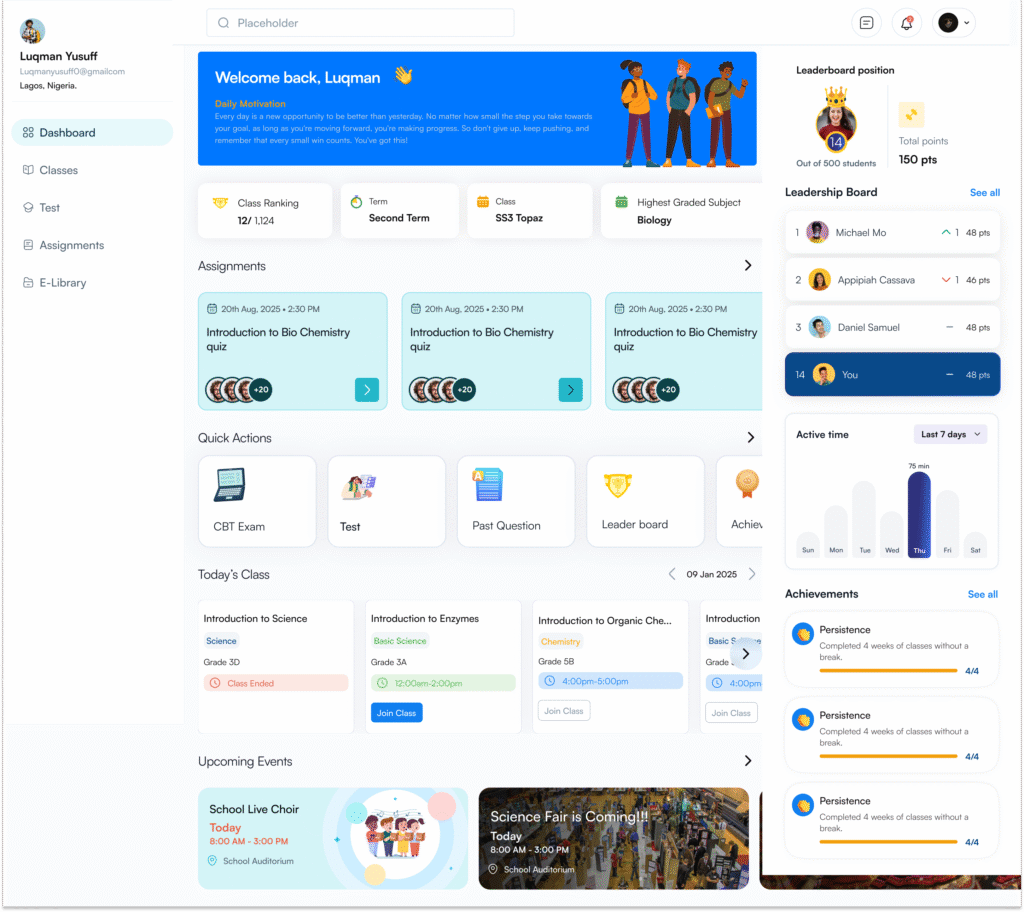
Scenario
- School: Greenfield International School, Lagos
- Challenge: Parents frequently called the school to request term exam results. Teachers spent hours preparing and distributing paper reports. Student performance tracking was inconsistent, and administrative work was overwhelming during exam season.
- Goal: Streamline result access, reduce administrative workload, and give parents and students easy, secure online access.
Implementation with ExcelMind
- Centralized Student Records:
All student data, including academic history, class enrollment, and term assessments, were uploaded to ExcelMind. - Online Result Access:
Parents and students received secure logins to access results directly from the school portal. Term exams, class tests, and continuous assessments were organized by term and subject, ensuring clarity. - Automated Notifications:
ExcelMind automatically notified parents when new results were available, reducing repeated inquiries and improving engagement. - Performance Tracking:
Teachers could monitor student progress, identify areas needing support, and update assessment records in real-time. - Administrative Efficiency:
The school reduced paper handling, eliminated manual result distribution, and minimized errors in record-keeping.
Outcome
- Parents reported higher satisfaction due to instant, reliable access to their child’s results.
- Teachers saved hours weekly, focusing more on teaching and student support.
- The school administration achieved better record-keeping and compliance during exam periods.
- Overall, result management became transparent, secure, and efficient, aligning perfectly with the school’s goal to provide quality education.
This example demonstrates that with ExcelMind, school owners can offer seamless, secure, and accessible online result management, making internal exams, term assessments, and student tracking effortless for staff, students, and parents.
Troubleshooting Common Issues When Checking Student Results Online
Even with structured systems, students and parents may encounter issues when accessing results online. Schools that prepare for these scenarios can reduce confusion and ensure a smooth experience.
1. Incorrect login credentials
- Ensure the student ID, parent login, or password is entered correctly.
- If credentials are forgotten, schools should provide a secure password reset option.
- ExcelMind allows administrators to manage user access efficiently, reducing login-related issues.
2. Portal downtime or slow access
- During peak exam result periods, portals may slow down or become temporarily unavailable.
- Schools can advise parents to try accessing results during off-peak hours.
- ExcelMind’s cloud-based system provides reliable, high-availability access for internal results.
3. Missing or incomplete results
- Occasionally, a student’s result may appear incomplete due to delayed updates or errors in assessment entry.
- Parents should contact the school for clarification.
- ExcelMind ensures centralized records and audit trails so missing results can be quickly identified and corrected.
4. Difficulty navigating the portal
- Some parents or students may be unfamiliar with online systems.
- Schools should provide step-by-step guides or video tutorials.
- ExcelMind’s interface is user-friendly and intuitive, reducing navigation difficulties for all users.
5. Printing or downloading issues
- Some users may experience trouble exporting results as PDF or printing directly.
- Schools can provide guidance on browser settings or alternative download methods.
- ExcelMind allows results to be downloaded securely, making documentation easy for parents.
By anticipating these common issues and implementing solutions, schools can ensure students and parents have a smooth experience when checking internal exam and assessment results online.
See Also:How Digital School Management Platforms Boost Student Achievement
Conclusion:
Providing students and parents with easy online access to results is a crucial part of modern school administration. Schools that implement structured, secure, and organized systems improve transparency, save administrative time, and enhance parent and student satisfaction.
With ExcelMind, school owners can ensure:
- Centralized student records for all term exams, class tests, and continuous assessments
- Secure and role-based access for parents and students
- Automated notifications when new results are available
- Real-time progress tracking for teachers and administrators
By adopting ExcelMind, schools can offer parents and students a smooth, reliable, and secure way to check results online, reducing confusion and streamlining internal processes.
Book a demo with ExcelMind today and see how your school can provide efficient online access to student results while saving time and improving engagement.